
Everyone I talk to about AI in accounting says, “It can do so much.”
Then I ask what they mean, and I get a completely different answer depending on who I’m talking to.
Some people mean “I use ChatGPT to rewrite emails.”
Other people mean “we’ve got transactions flowing in, coded automatically, with an exception queue and approvals.”
Those are not the same thing.
So this is an intro post for a series I’ll be doing over the coming months. My goal is simple:
- Show the end state we’re all trying to build toward
- Give us a clean way to talk about where you are today
- Get your feedback (and real examples) so I can make the next posts useful
THE IDEAL END STATE (WHAT THIS IS ALL TRYING TO BECOME)
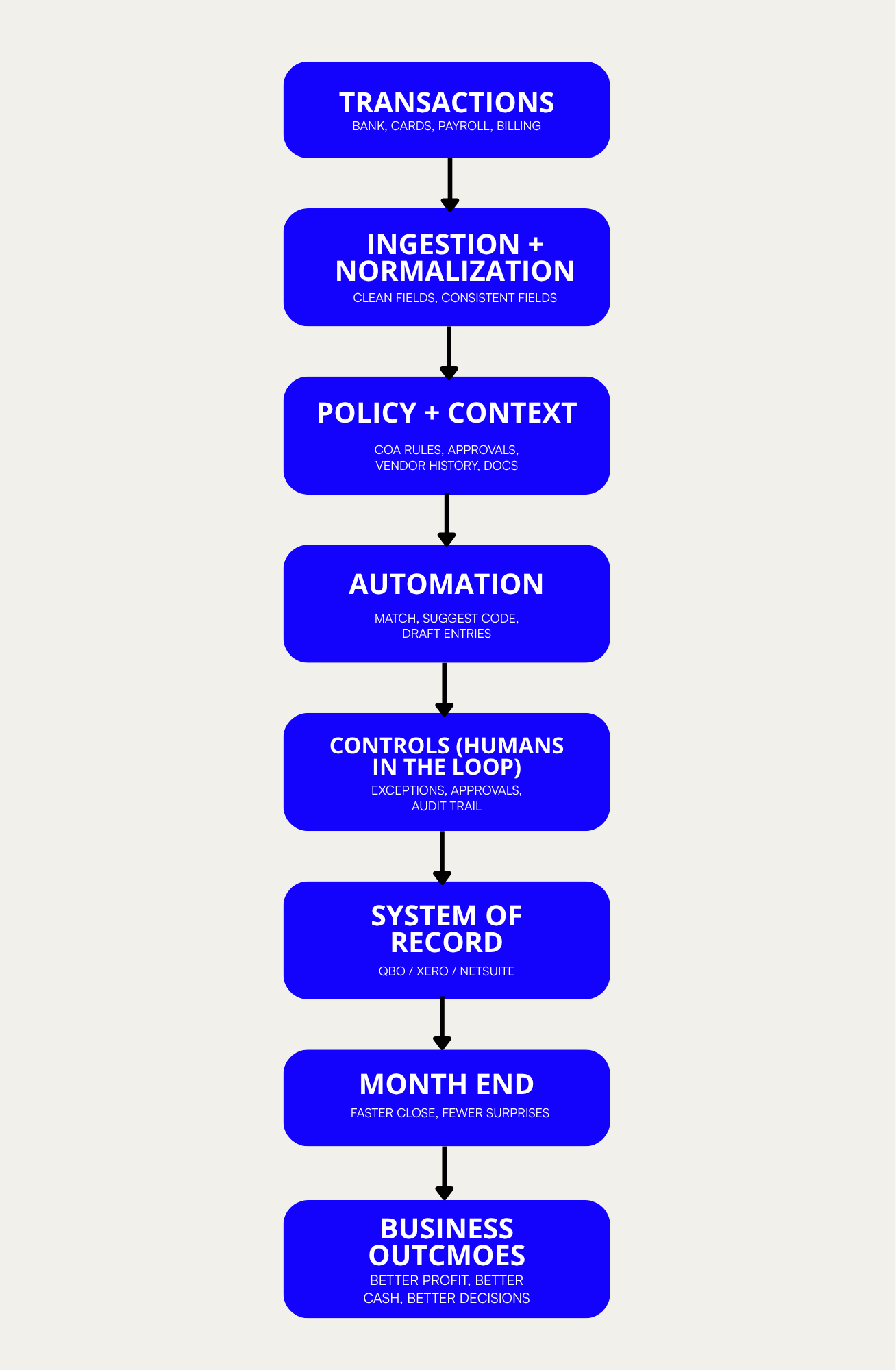
Here’s the picture in my head: accounting becomes a live pipeline with humans in the loop, instead of a monthly batch project where everything stacks up until “close.”
flowchart TD
	A["TRANSACTIONS<br>(bank, cards, payroll, billing)"] --> B["INGESTION + NORMALIZATION<br>(clean feed, consistent fields)"]
	B --> C["POLICY + CONTEXT<br>(COA rules, approvals, vendor history, docs)"]
	C --> D["AUTOMATION<br>(match, suggest code, draft entries)"]
	D --> E["CONTROLS (HUMANS IN THE LOOP)<br>(exceptions, approvals, audit trail)"]
	E --> F["SYSTEM OF RECORD<br>(QBO / Xero / NetSuite)"]
	F --> G["MONTH END<br>(faster close, fewer surprises)"]
	G --> H["BUSINESS OUTCOMES<br>(better profit, better cash, better decisions)"]
The point is not “AI does your books.”
The point is: transactions flow in clean, policy gets applied consistently, exceptions get reviewed daily, and month end is basically already done. When that happens, you get faster financials, fewer surprises, and more trust in the numbers you’re using to make decisions.
THE 5 LEVELS (BUCKETS) OF AI IN ACCOUNTING
I’m not trying to create perfect definitions. I just want a shared ladder so when someone says “we’re using AI in accounting,” we can actually understand what they mean.
LEVEL 1: ASSISTED (CHAT + MANUAL CONTEXT)
AI is outside the accounting workflow. You give it context manually, and you copy the output back into your work.
Tools: ChatGPT/Claude/Gemini, plus uploads (PDFs, statements, invoices, contracts, policies) and exports (CSV).
What people are doing here:
- Summarizing invoice + email threads so a human can decide next steps
- Pulling clauses out of a vendor contract (payment terms, auto-renew, fees)
- Cleaning up messy exports so someone can reconcile or categorize faster
- Drafting collections emails, vendor disputes, client explanations
LEVEL 2: AUGMENTED (AI FEATURES INSIDE YOUR ACCOUNTING TOOLS)
AI is now inside the tools you already use, and/or you’re doing real work inside a co-worker style work surface. It’s still human-driven, but it’s no longer random one-off chat.
Tools: built-in AI features in accounting/reporting apps, plus add-ons (coding suggestions, anomaly flags, “explain this variance”), plus work surfaces (Claude co-worker, ChatGPT work surface) where the team can live day-to-day.
What people are doing here:
- Getting coding suggestions and sanity checks while booking transactions
- Asking “why did this spike?” and getting a first-pass explanation
- Drafting reconciliation notes and month-end narratives from the numbers
LEVEL 3: CONNECTED (MULTI-SYSTEM CONTEXT)
AI stops being generic because it can see more of the financial world than just the GL. This is often where the work surface becomes a real finance desk because it’s fed by systems, not just uploads.
Tools: work surfaces plus connectors into some combination of accounting + bank/cards + payroll + bill pay + billing/job system.
What people are doing here:
- Matching deposits to invoices and flagging short pays/unapplied cash
- Building a “what changed this week/month?” view that spans multiple systems
- Drafting a close checklist based on what’s missing, late, or unusual
LEVEL 4: ORCHESTRATED (WORKFLOWS + HUMANS IN THE LOOP)
This is where “AI in accounting” turns into workflows: rules, routing, approvals, and exception handling.
Tools: automations + API access + exception queues + approval flows (and sometimes lightweight custom interfaces).
What people are doing here:
- Auto-coding routine spend, but kicking low-confidence items to an exception queue
- Enforcing evidence requirements (receipt/PO/approval) before something clears
- Drafting entries, routing them for approval, then posting with an audit trail
LEVEL 5: GOVERNED (PRODUCTION-GRADE + AUDITABLE)
Same idea as Level 4, but now it’s reliable and controllable enough to run daily without heroics.
Tools: everything in Level 4, plus governance: permissions, logging, monitoring, rollback, separation of duties, change control, and maintainable review consoles.
What people are doing here:
- Running a real review console: exceptions, approvals, and “why was this coded this way?”
- Automated feed, plus alerting when feeds/pipelines break (bank, payroll, bill pay, revenue)
- Locking down who can change rules vs. who can approve exceptions
- What Level 4 looks like when this becomes real software (without heroics)
HOW ARE YOU USING AI IN ACCOUNTING? (I WANT YOUR REAL EXAMPLES)
To do this series, I want to see what you’re actually doing in the wild.
If you’re willing, reply with whatever you can answer:
- What’s your role? (owner, bookkeeper, controller, CFO)
- What accounting system are you on? (QBO, Xero, NetSuite, other)
- Which level do you feel you are currently at (1–5)?
- What’s one workflow you’ve improved with AI (even if it’s small)?
- What’s one workflow you want to improve next, but can’t quite get working?
Answer one or all. If you want, I’ll send back a few prompts based on your level, or we can do a quick show-and-tell call.

